
 EN
EN  DE
DE 
In practice, every embedded software must perform a multitude of distributed and centrally coordinated tasks. Software patterns not only ensure conceptual integrity but also enable scalability across different projects. In the second part of our series, we focus on the managers and their diverse functions.
Initialization (procedural approach)
In procedural environments, manager modules are used, symbolized by the "m" before their names. Within the AEn architectural element, the mAEnManager is responsible for its modules m1…mN.
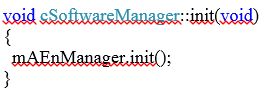
`main()` calls `init()` from the `mSoftwareManager`. This function, in turn, calls the `initAEn()` functions of all `mAEnManagers` in the required order (delegations). These functions initialize the modules according to their respective responsibilities. The principle of delegation is applicable to most other managerial functions.
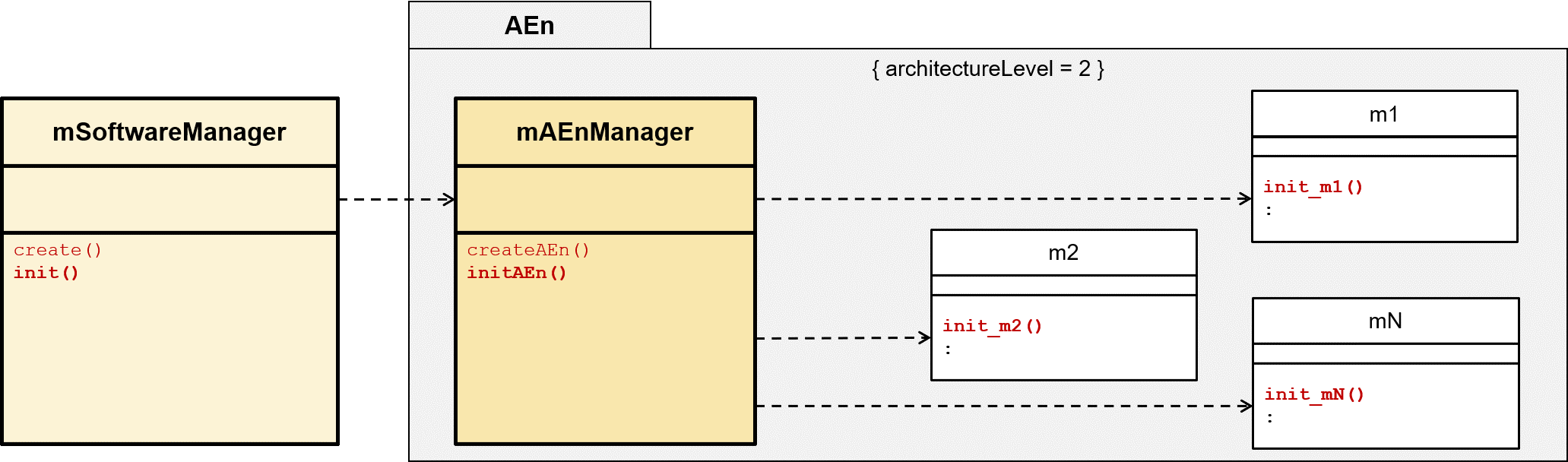
Figure 5: Manager Pattern for a Procedural Approach
In contrast to an object-oriented approach, procedural programming often does not require object instantiation. Therefore, the `create()` function could potentially be omitted. The constructors and destructors of classes, familiar from object-oriented programming, can be replaced in procedural programming by manually called functions `construct()` and `destruct()`.
Object instantiation and initialization (object-oriented approach)
`main()` instantiates a `cSoftwareManager` object. This instantiates all `cAEnManager` objects, which in turn instantiate all objects of classes `c1`... `cN` under their respective responsibility. Depending on the applied relationships (association, aggregation), the `createX()` functions dynamically create their objects on the heap, depending on the implementation. With composition applied throughout, all objects are automatically created on the stack, eliminating the need for the `createX()` functions.
The `initX()` function allows for additional initializations besides the constructor call. Alternatively, the constructor can call the respective `initX()` function.
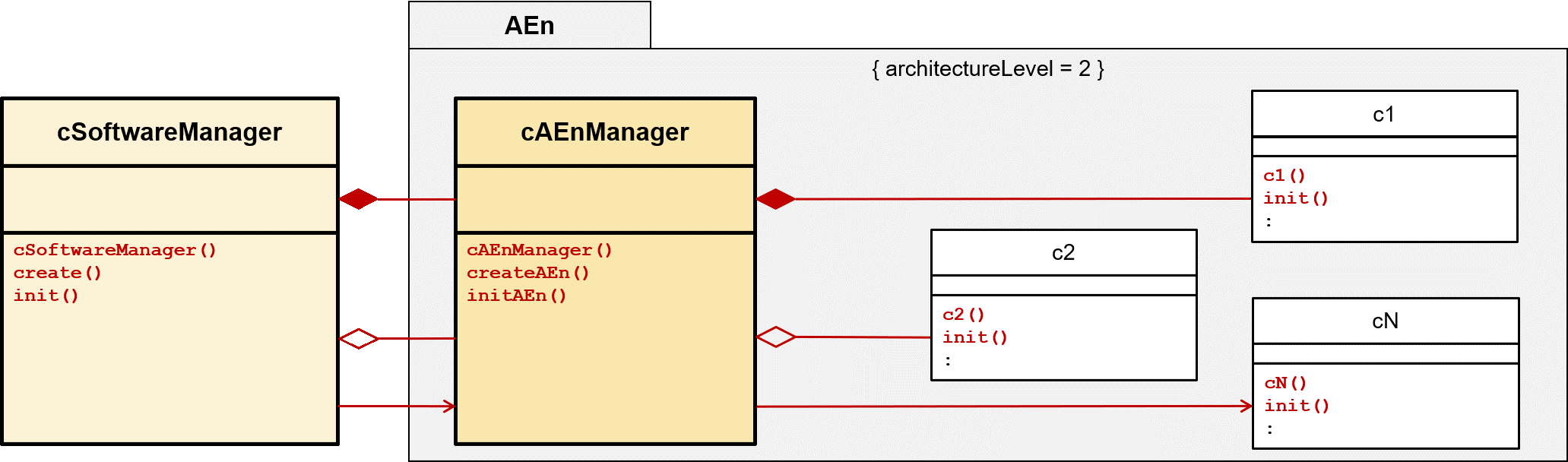
Figure 6: Manager Pattern for an object-oriented approach
If the architectural hierarchy is deeper than the one shown here, the process described above extends across the entire hierarchy.
As a result of this step, all objects are instantiated and initialized.
Initializing the relations
The `buildXRelations()` function initializes the relationships (association, aggregation) between objects internally, but also across architectural element boundaries. This includes callback registrations. Typically, pointers with the corresponding object address are initialized.
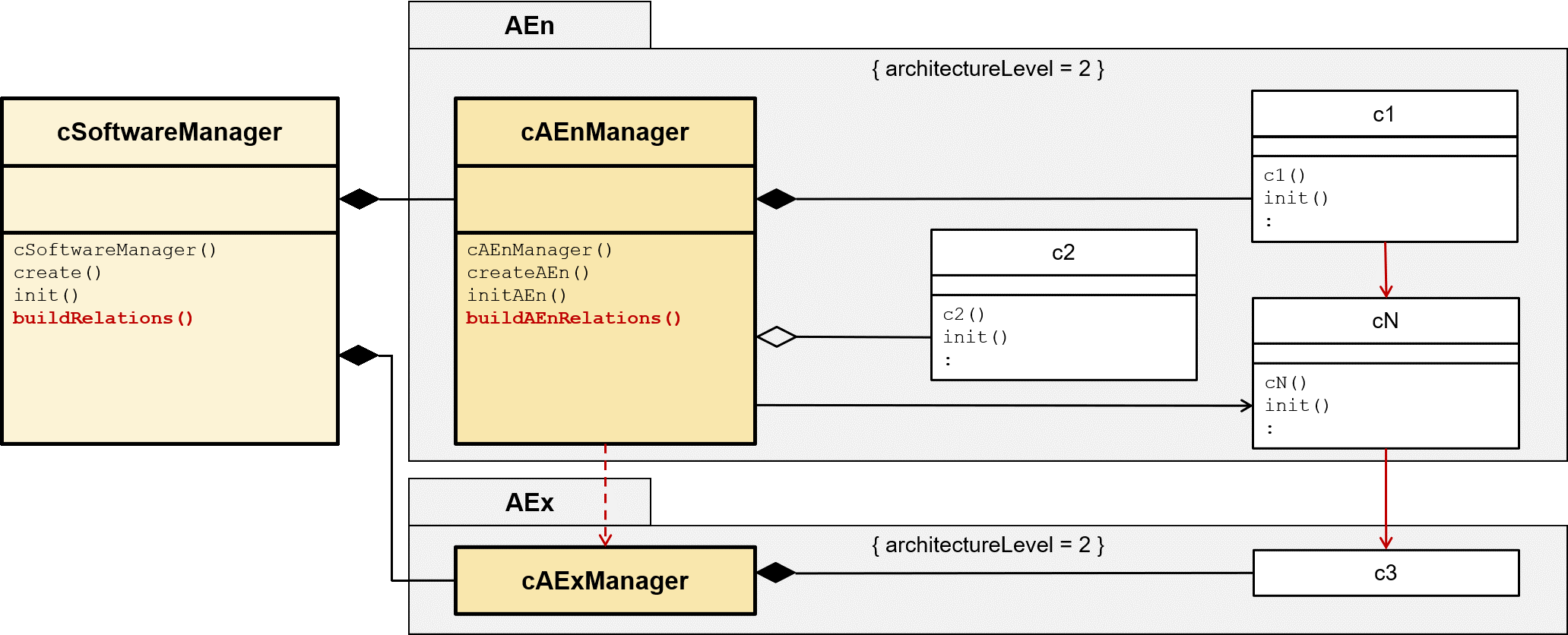
Figure 7: Manager Pattern supplemented with relation initialization
This often requires object addresses from adjacent architectural elements. If these AEnManagers are aware of each other, they can exchange object addresses.
Configuration, parameterization, database access
Once initialization is complete, the software detects, for example, the hardware on which the execution is taking place. Depending on the result, the SoftwareManager reads the corresponding parameters from a local or cloud-based database.
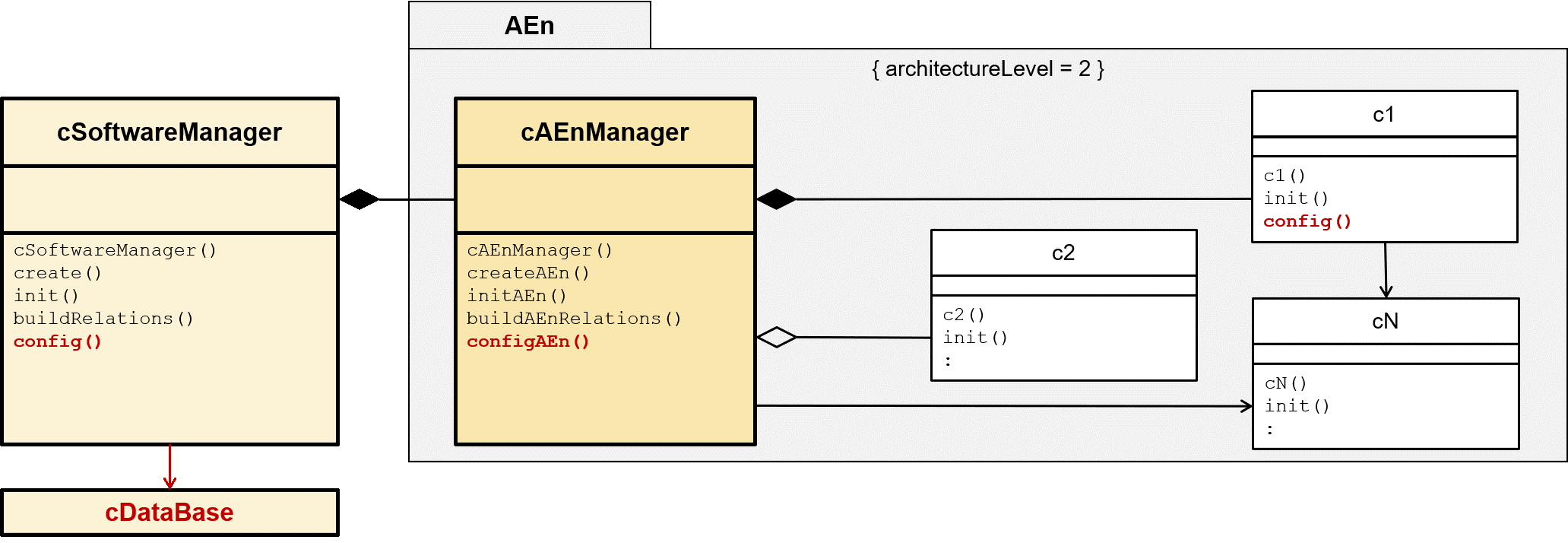
Figure 8: Manager Pattern supplemented with configuration
The `configX()` function of the AEnManager passes the parameters to the classes/modules to be configured. It's possible that `configX()` can be executed before `initX()` and passes the parameters via the `initX()` function.
Resource allocation
The individual architectural elements may require additional individual resources for continued operation. Especially in functionally safety-critical embedded software, it is recommended to fully allocate the necessary resources at the start of software execution. This ensures that all resources are available at runtime and simultaneously improves runtime performance.
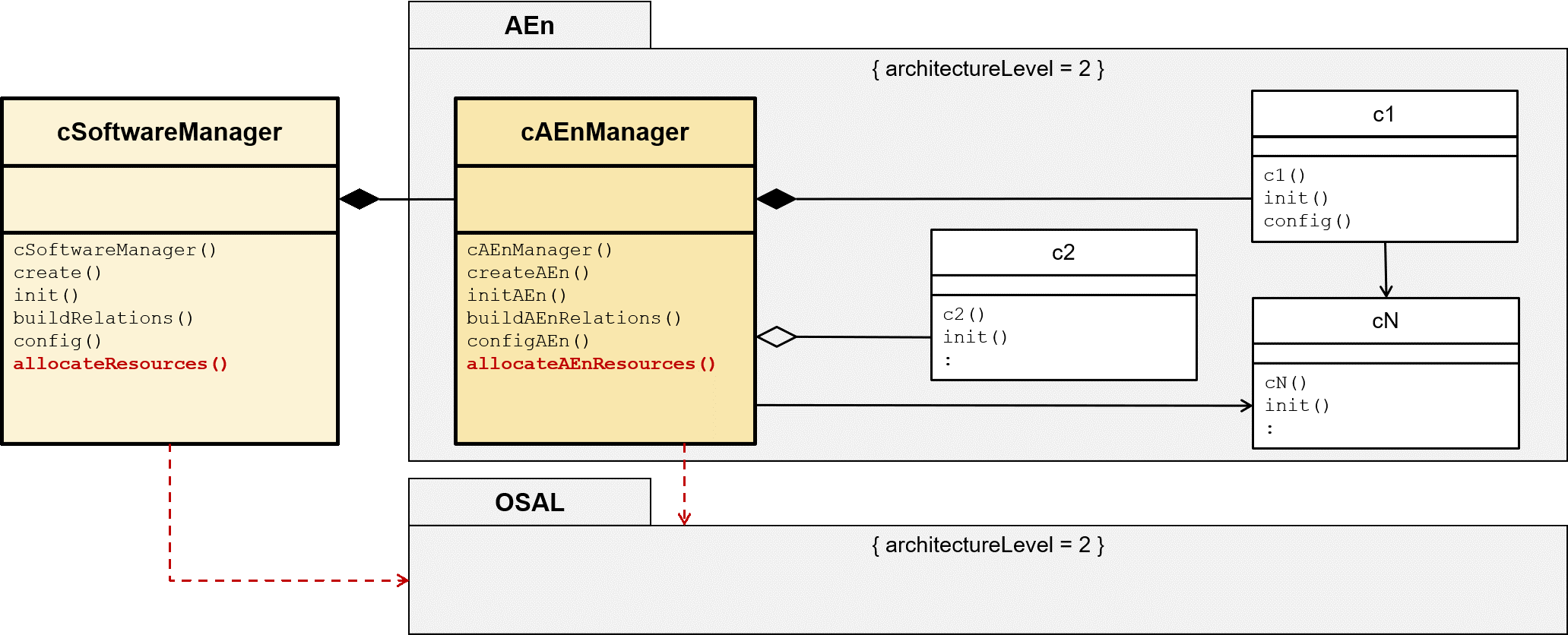
Figure 9: Manager Pattern supplemented with resource allocation
Resources include, for example, memory or, in the case of an operating system, operating system components such as mailboxes, event groups, semaphores, mutexes, and timers. This requires that the operating system allows this before the boot process. If not, the order of function calls can be changed, or the `allocateXResources()` function call can be moved to the architecture-element-specific `taskInit()`.
Operational phase: Without operating system
A bare-metal application executes one or more functions continuously. Here, the `run()` function contains this central `while(true)` loop and executes the `runAEn()` functions continuously in a predefined order.
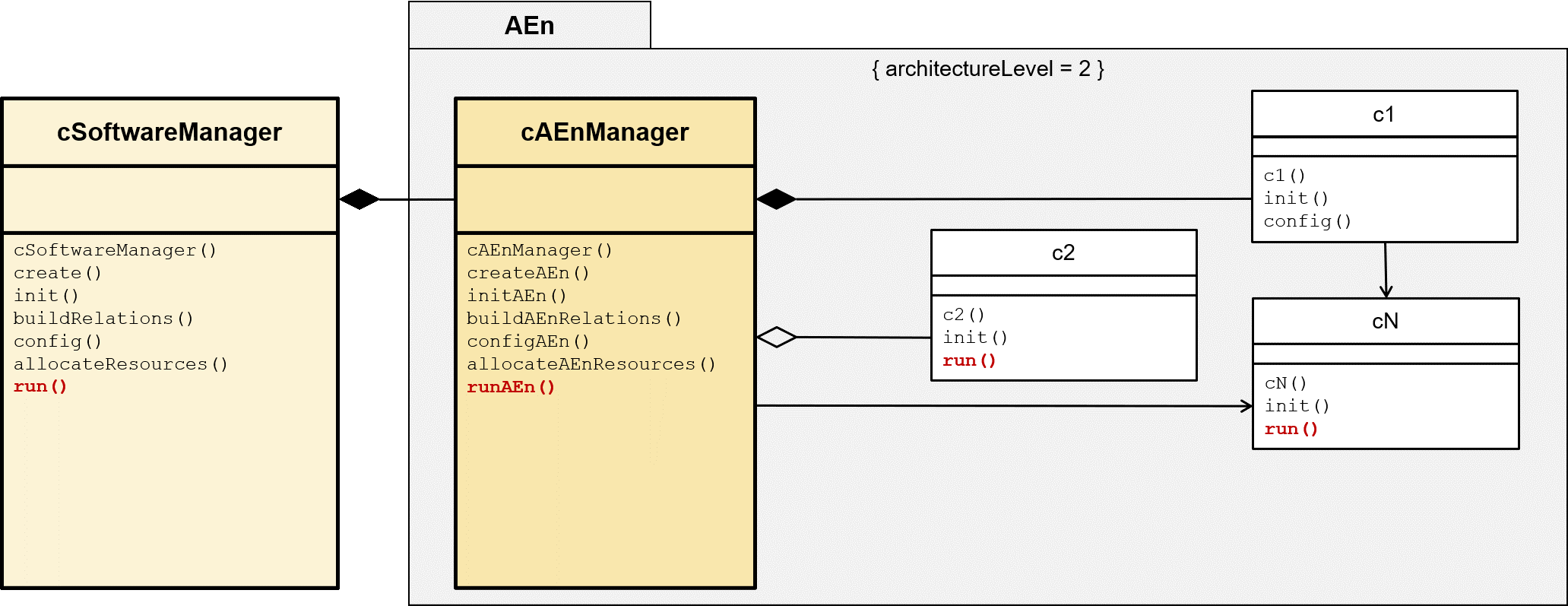
Figure 10: Manager Pattern supplemented with operational phase
Boot, startup and operational phase: With operating system
The SoftwareManager's `start()` function boots the operating system. The operating system then schedules `taskInit()` as its first task. This creates `taskOperation()` and all `taskAEnInit()` tasks of the AEnManager. It then terminates itself. `taskAEnInit()` creates `taskARnOperation()` and, if necessary, other architecture element-specific tasks. It also then terminates. Now the actual operational phase begins with the scheduling of the remaining tasks.
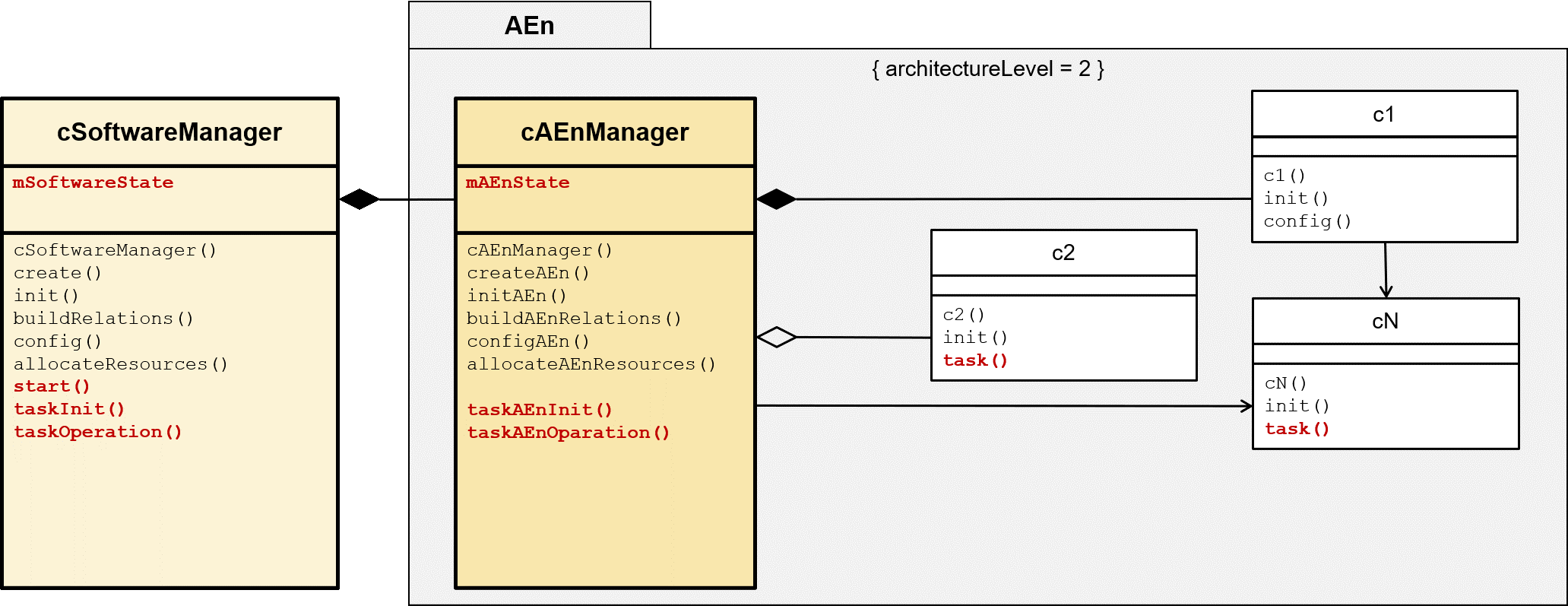
Figure 11: Manager Pattern for Startup and Operational Phase
The manager task functions `taskXOperation()` contain a state machine that represents the current state of the software or its individual architectural elements. This state machine is presented later in this chapter.
diagnosis
The `executeDiagnostics()` function of the SoftwareManager starts the diagnostic execution and collects all diagnostic data via the calls to the `executeAEnDiagnostics()` functions contained in the AEnManagers.
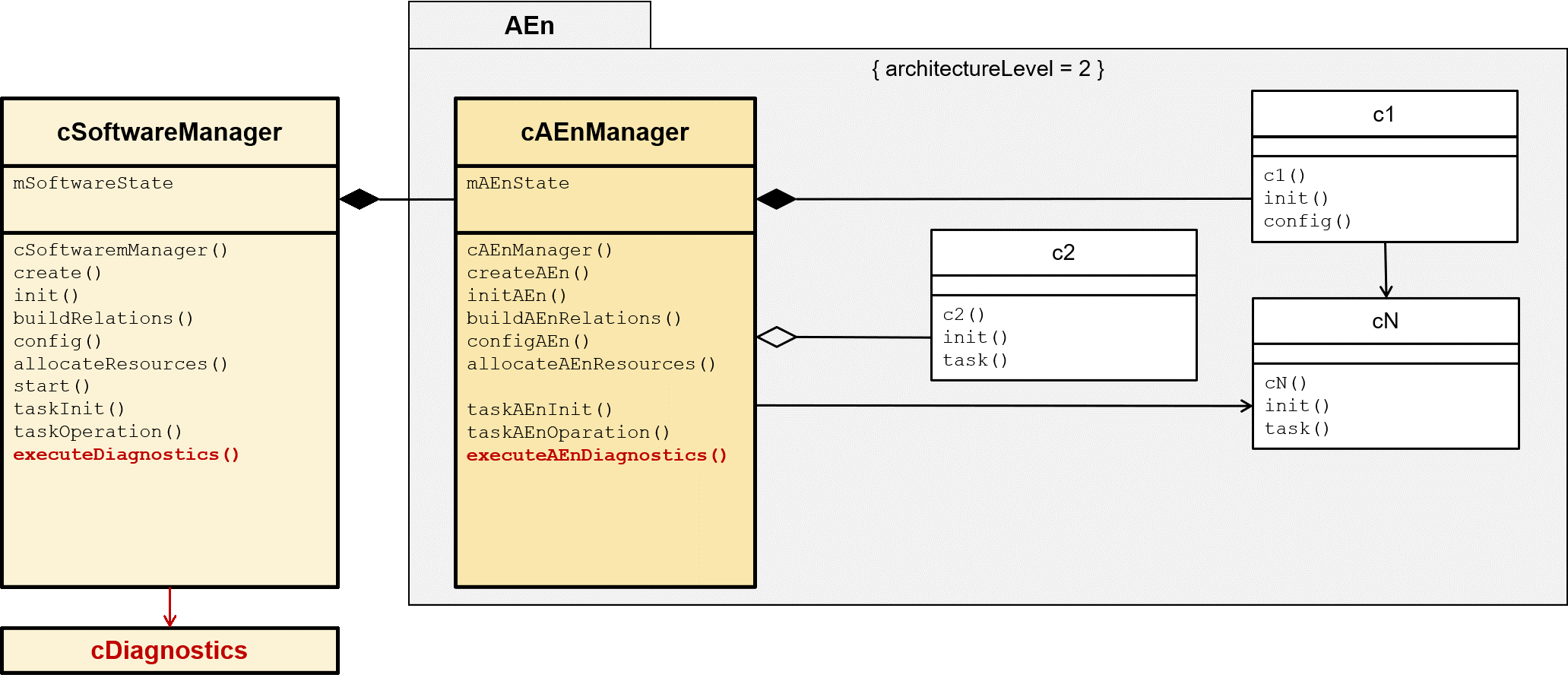
Figure 12: Manager Pattern supplemented with diagnosis
The Diagnostics element stores or enables the output of the stored data.
Restart
The restart() function of the SoftwareManager triggers the software restart by restarting the individual architectural elements through calls to the restartAEn() functions contained in the AEnManagers.
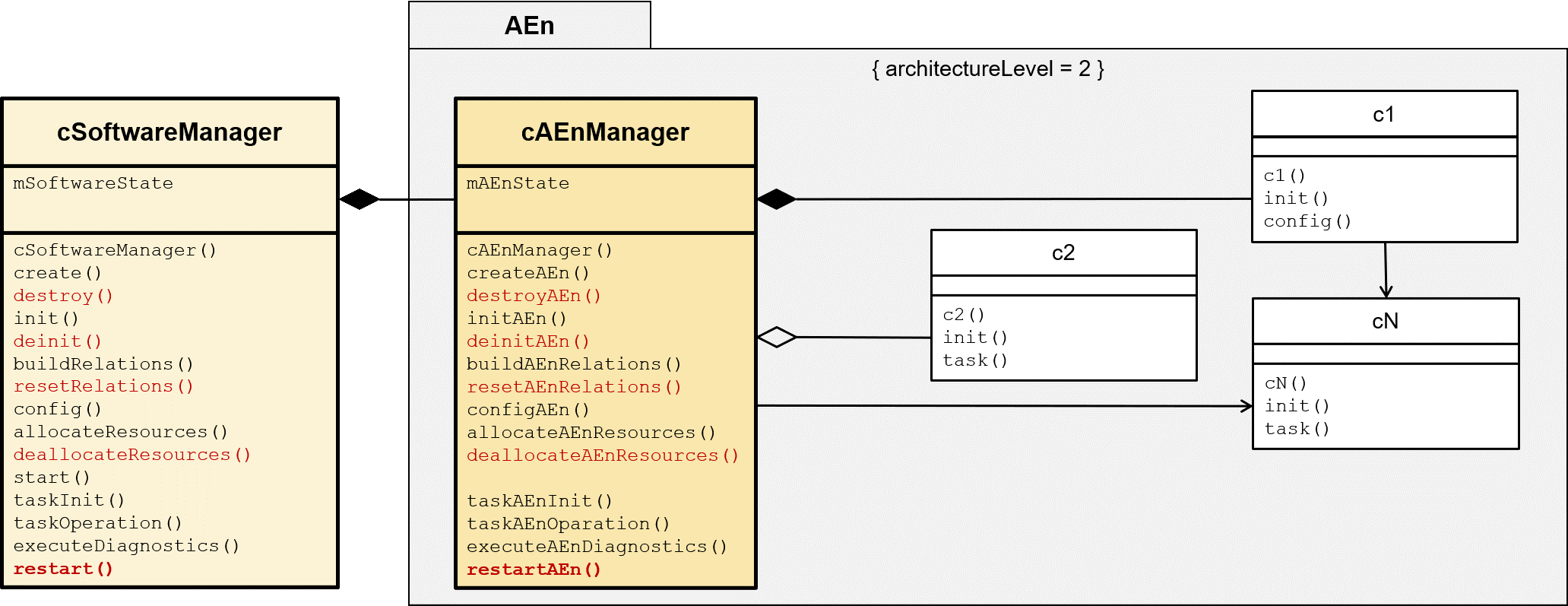
Figure 13: Manager Pattern supplemented with restart
To further subdivide the restart, but also the shutdown explained below, the functions that are opposite to those performed by the managers during the startup process are used.
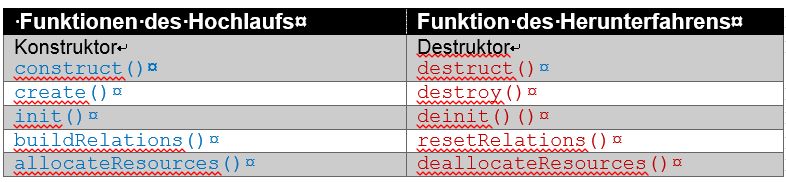
Shutdown
The shutdown() function of the SoftwareManager triggers the shutdown of the software by shutting down the individual architectural elements through calls to the shutdownAEn() functions contained in the AEnManagers.
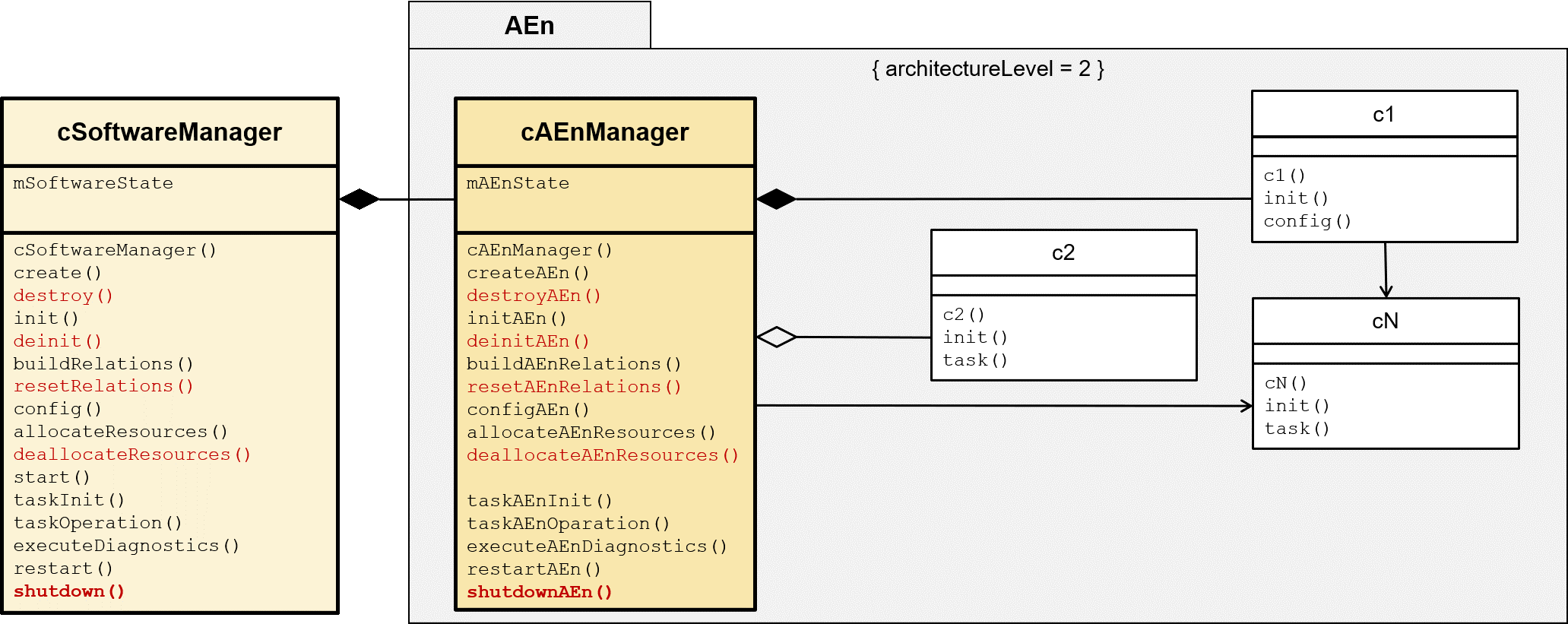
Figure 14: Manager Pattern extended to include shutdown
Central error handling
The classes c1…cN and modules m1…mN detect their errors and report them to their AEnManager. The AEnManager then forwards these errors directly to the higher-level SoftwareManager. The SoftwareManager centrally handles error management, including for any errors that may occur within the AEnManagers themselves.
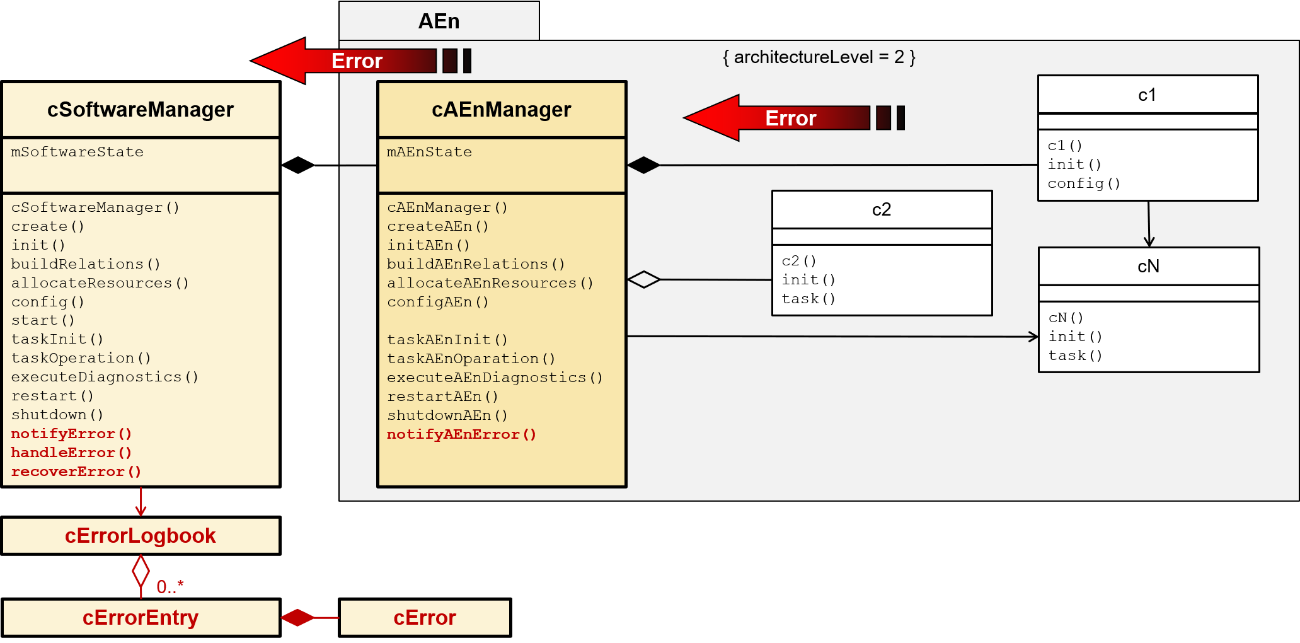
Figure 15: Manager Pattern supplemented with central error handling
In addition to handling errors correctly, e.g. using handleError() and recoverError(), the SoftwareManager also records the error in its ErrorLogbook.
Decentralized error handling
The classes c1…cN and modules m1…mN detect their errors and report them to their AEnManager. If the AEnManager can resolve the error, it does so and records the error in its local ErrorLogbook.
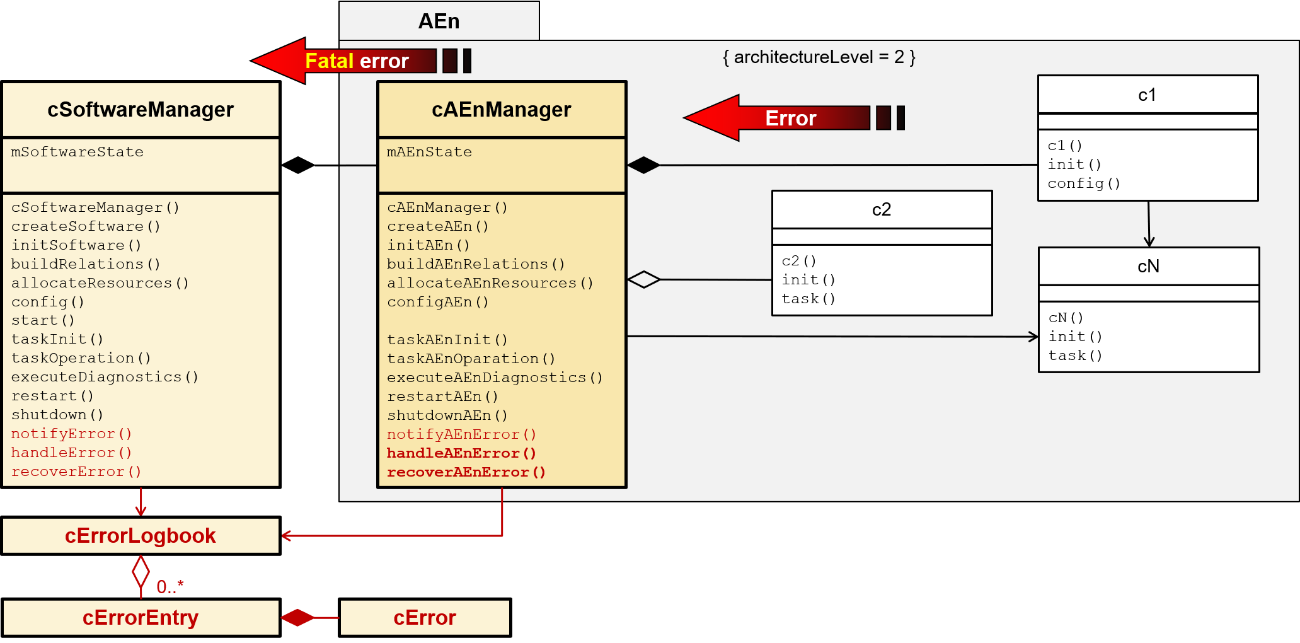
Figure 16: Manager Pattern extended to include decentralized error handling
Fatal errors that the AEnManager cannot handle itself are forwarded to the higher-level SoftwareManager. The SoftwareManager then takes over the fatal error handling and records it in its ErrorLogbook.
Manager State Sequence Automaton
The SoftwareManager state sequence machine represents the possible states of the entire software or system. The AEnManager state sequence machine represents the possible states of the individual architectural element.
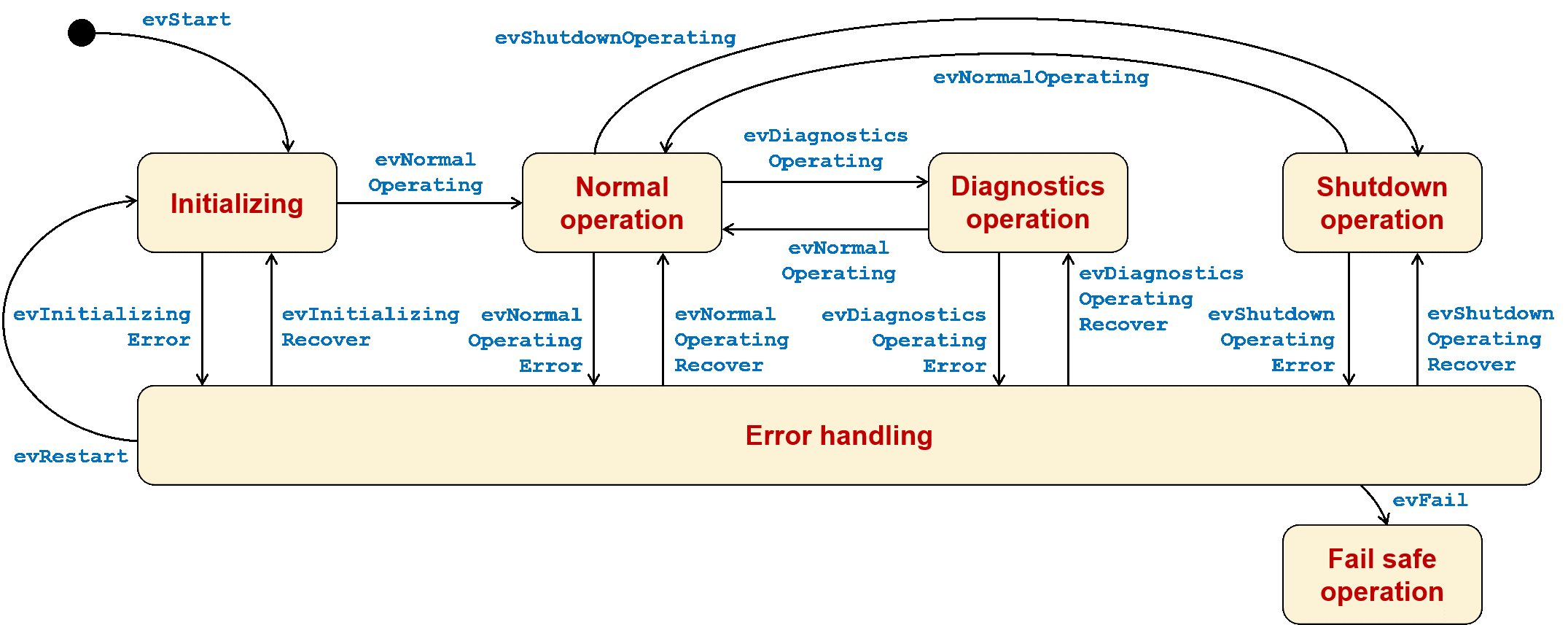
Figure 17: Manager state sequence automaton
Manager execution flow
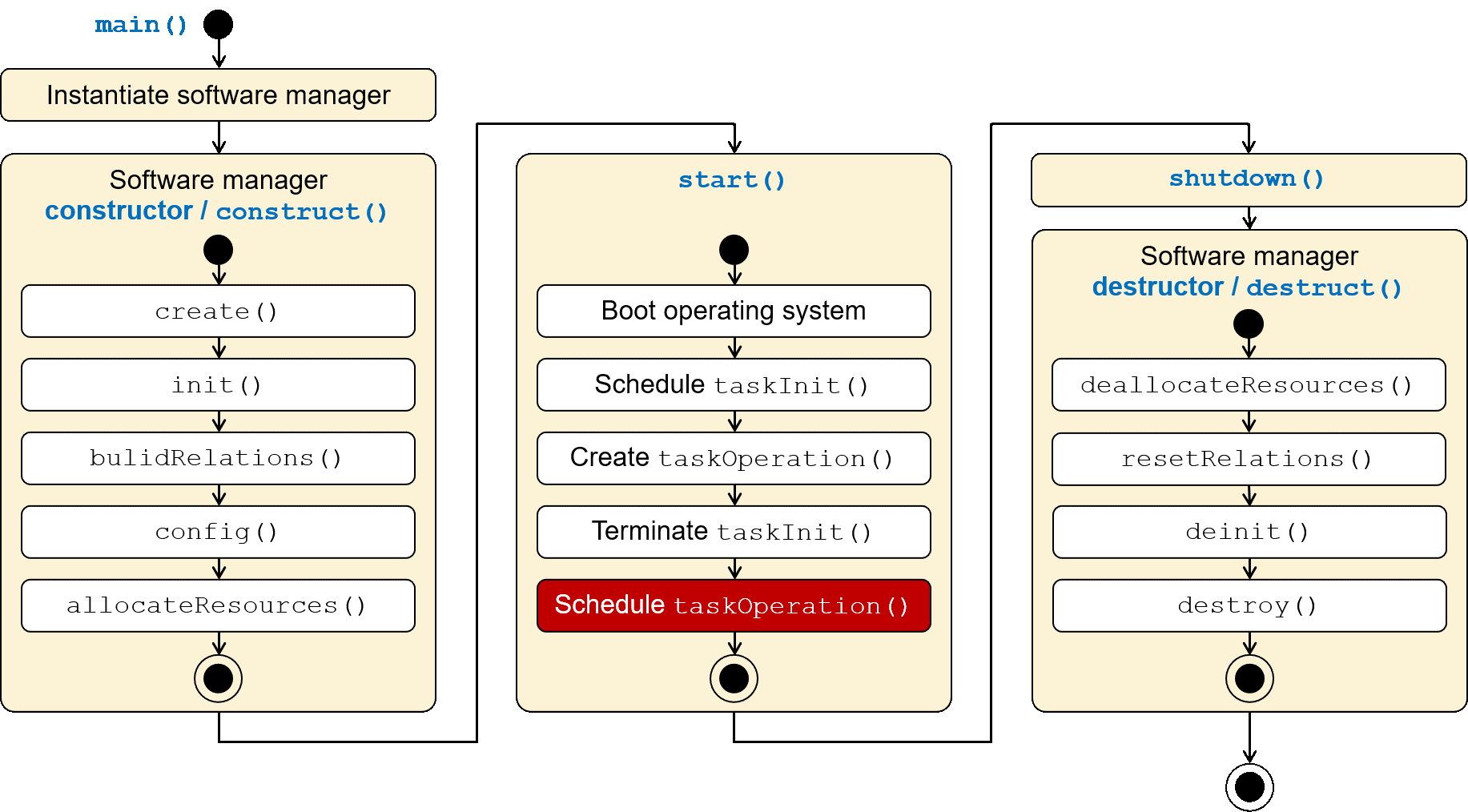
Figure 18: Manager execution flow at the top level
As an interim summary, the execution flow of the individual functions at the SoftwareManager level is shown here. Behind this are the delegating calls of the AEnManager. This is just one of many possible execution patterns.
Discussion points and improvements
The Manager Pattern presented so far can be modified and expanded through further design and implementation details, as well as variations. A more detailed basic concept and a more detailed extended concept are presented below.
Detailed basic concept with error notification
In Common::Management, this is the error notification interface icbcErrorHandler (icbc == Iinterface Callback C(let) and other classes for diagnostics and error handling. These elements are used equally in all managers.
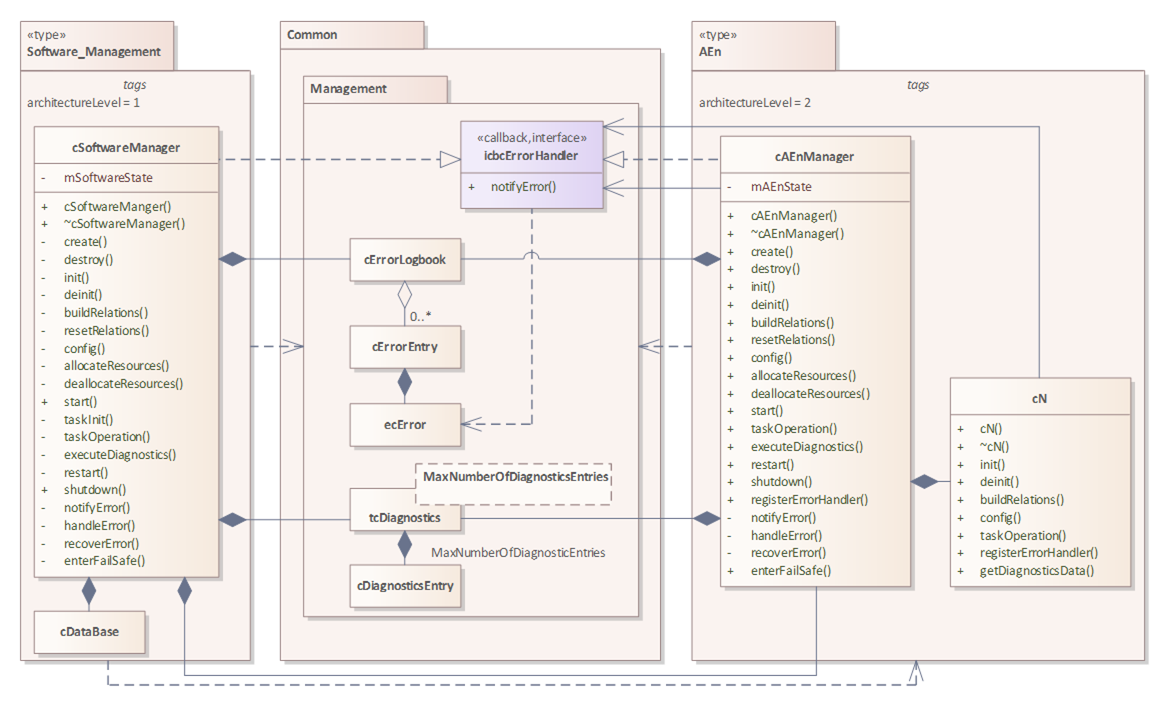
Figure 19: Detailed basic concept with error notification
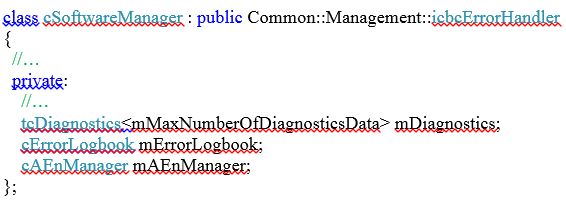
The application element cN notifies the cAEnManager of errors via the notifyError() function of the icbcErrorHandler interface. The cAEnManager, in turn, notifies the cSoftwareManager of its errors via the same interface.
When applying composition, object instantiation occurs as embedded elements/attributes:
The calls to the delegated functions must be made individually here, as no common types are defined:
The sample C++ program code of the detailed basic concept is included in the download for this article (see below).
Detailed extended concept with error notification and manager interface
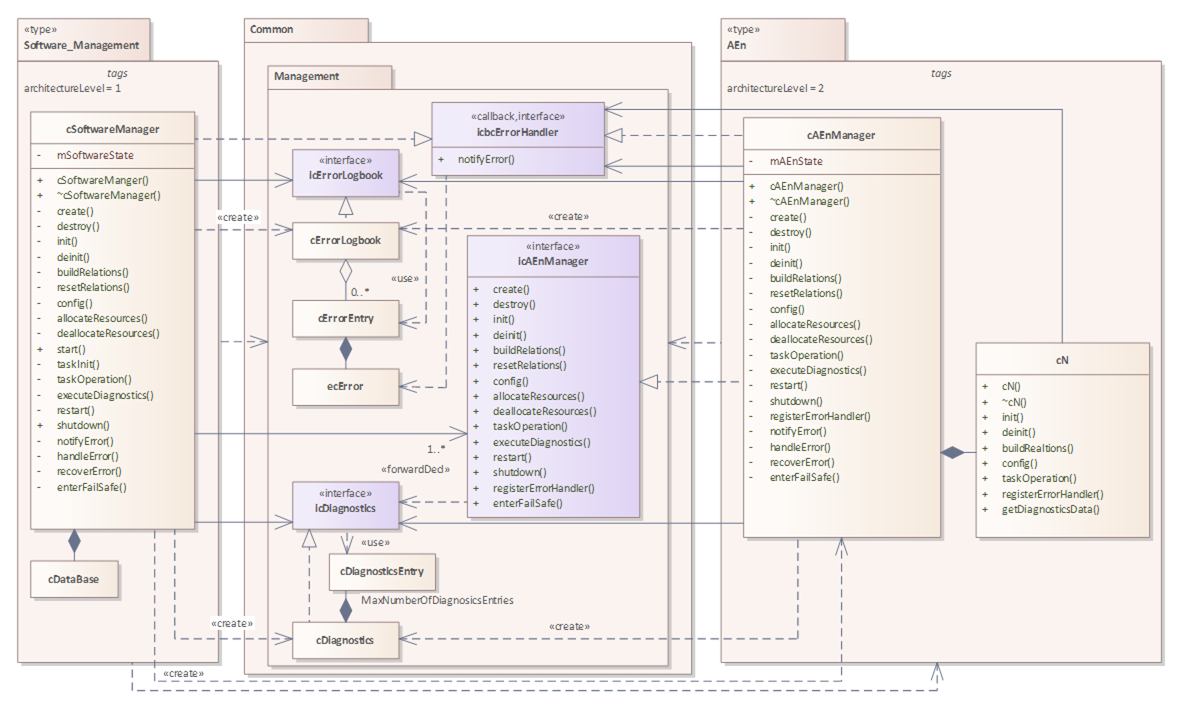
Figure 20: Detailed extended concept with error notification and manager interface
When using association/aggregation, object instantiation occurs dynamically and access is via pointers:
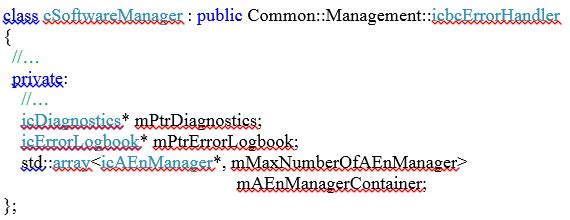
The delegated functions are called in a loop (easily extensible) because all cAEnManagers implement the common interface type icAEnManager (ic == Interface Class) and the cSoftwareManager accesses it via a pointer array:
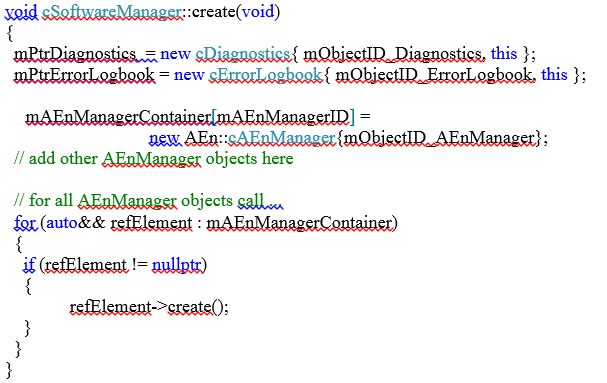
The exemplary C++ program code of the detailed extended concept is included in the download for this post (see below).
Summary
In practice, every embedded software must perform the distributed and centrally coordinated tasks presented here. Depending on the requirements, more or fewer of these tasks need to be performed. To maintain conceptual integrity across multiple projects, the use of software patterns is recommended. As with any pattern, the software architect, software developer, or software team must adapt the structures and processes presented here to the specific circumstances of the software.
The Part 1 of the article It illuminates the fundamentals of the Manager Pattern for coordinating various central tasks of the software.
Gain the right knowledge about how to apply the Embedded Software Manager Pattern in your software architectures and software design. This allows the concept to grow continuously with the ever-increasing complexity of the software, regardless of the programming language and programming approach (procedural/object-oriented). MicroConsult offers you professional support for this. training and coaching on the topics Analysis, design and architecture and much more.
Further information
MicroConsult download for this article, complete and up-to-date (zip)
MicroConsult Expertise: Embedded Software Engineering
MicroConsult training on the topic:

